OTForge Baseline
// Percoissa Products · OT Security · Windows Desktop

OT Security,
Simplified.

Know what you run. See your top 10 risks. Leave with a plan.

OTForge Baseline is an offline Windows app that helps a plant team build an OT asset inventory, answer a plain-language security check, and walk away with a ranked top-10 risk list, a 30/60/90-day plan and a one-page summary for leadership, all in an encrypted workspace that never leaves the PC.

Coming January 2027

Windows 10 & 11 (64-bit) · Fully offline · No account, no cloud

OTForge Baseline · Top 10 risks
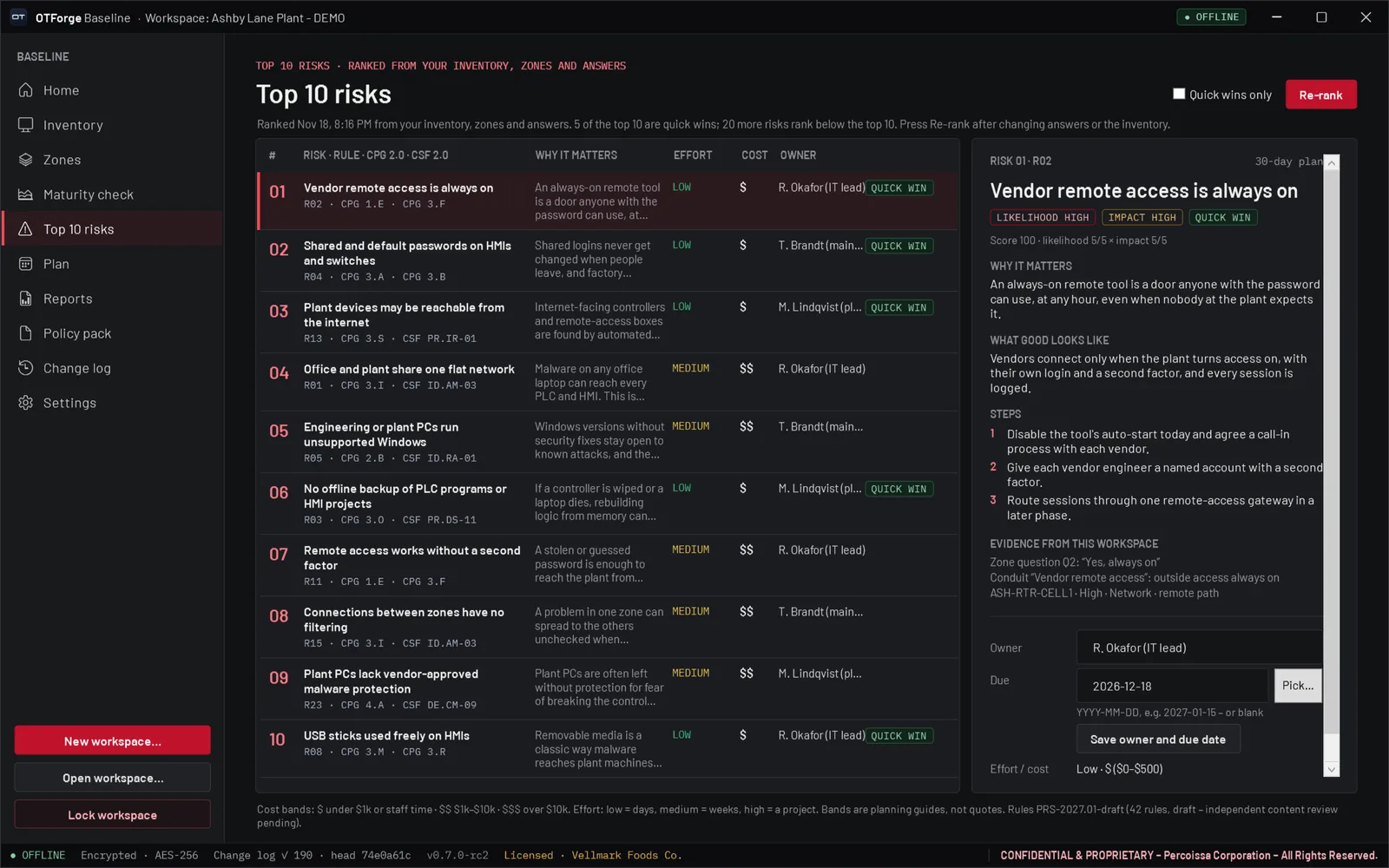
OTForge Baseline Top 10 risks screen ranking risks with evidence, owner and due date

Real screen · fictional demo data
01 — What It Does

From “where do
we start?” to a plan.

Built for small and mid-sized industrial teams who need a practical starting point, not an enterprise platform. Plain language on every screen, and every result comes from your own workspace.

/01

Asset Inventory

Import a spreadsheet, an ARP table, an earlier scan file or switch MAC tables, or add devices by hand. Criticality 1–5 with a “why”.

/02

Zones

Six plain-language questions build a suggested zone sketch: a layered diagram of zones and conduits you can adjust.

/03

Maturity Check

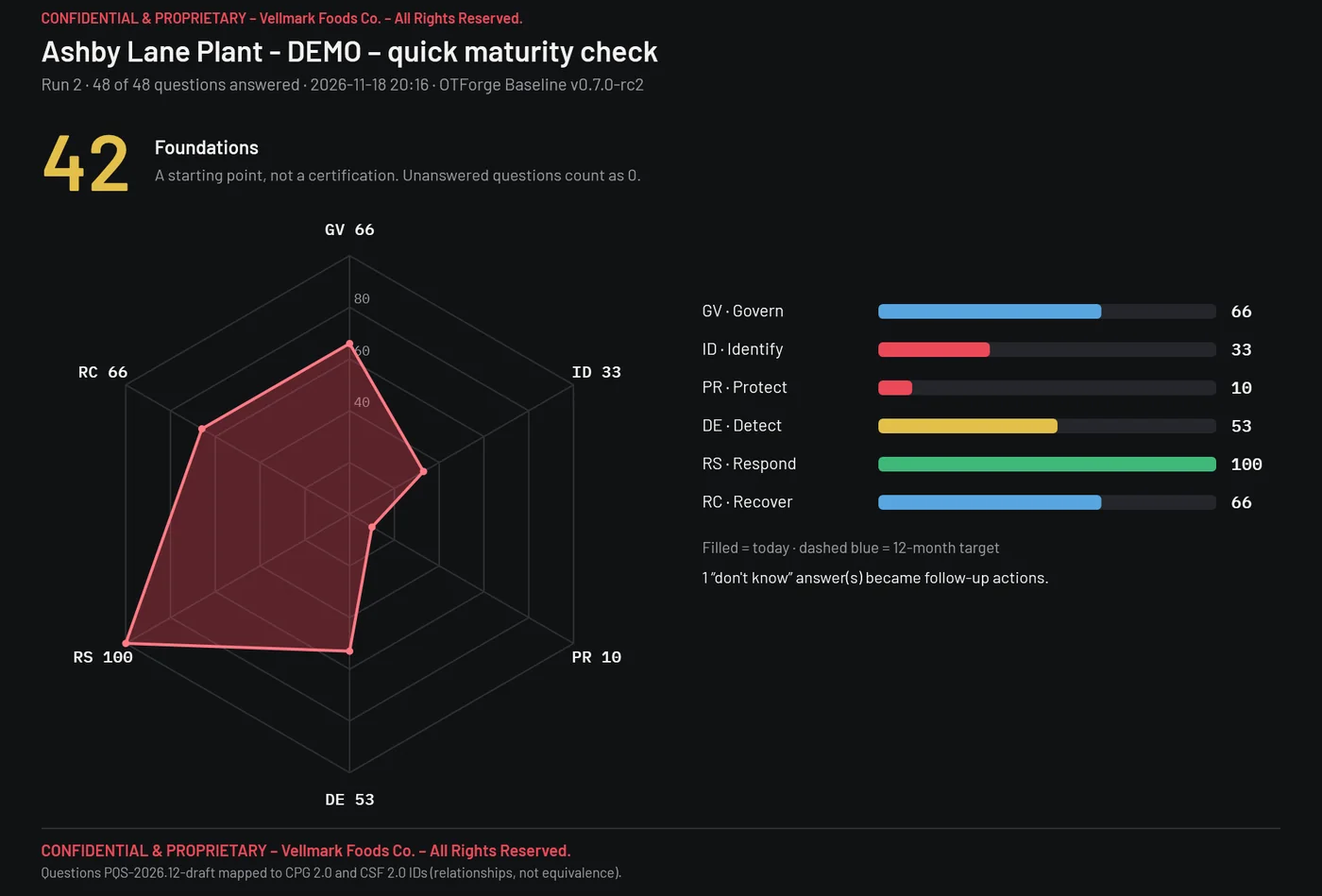
48 plain-language questions across six functions, with a score, a radar and editable 12-month targets.

/04

Top 10 Risks

42 rules run over your inventory, zones and answers. Each risk shows why it matters, what good looks like, three steps and the evidence.

/05

30/60/90-Day Plan

Generated from your top 10, with owners, a budget band, a projected score and an owner timeline. Edit, move and add actions.

/06

Reports

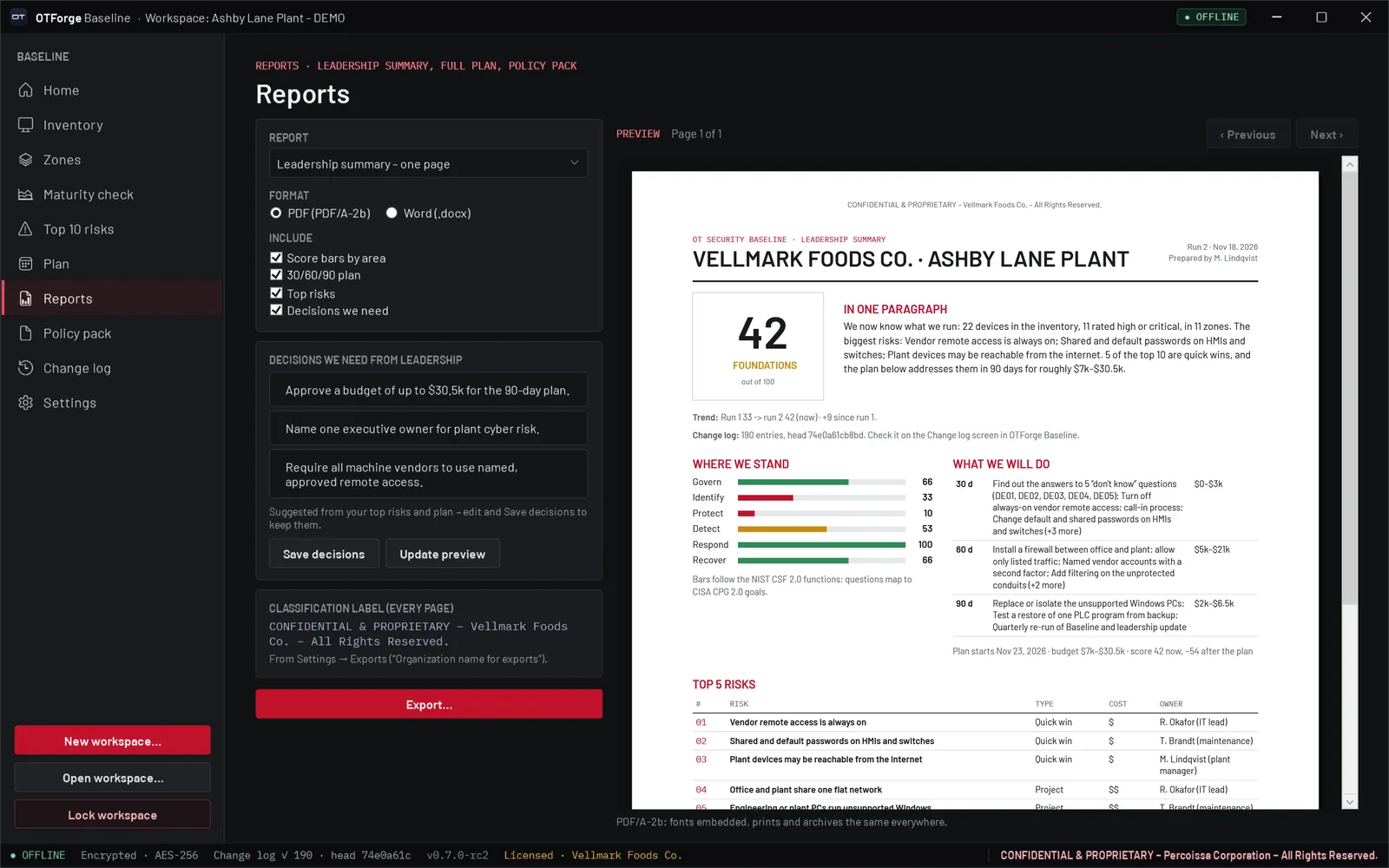
A one-page leadership summary and the full plan as PDF or Word, previewed in the app and marked with your organization’s confidentiality line.

/07

Policy Pack

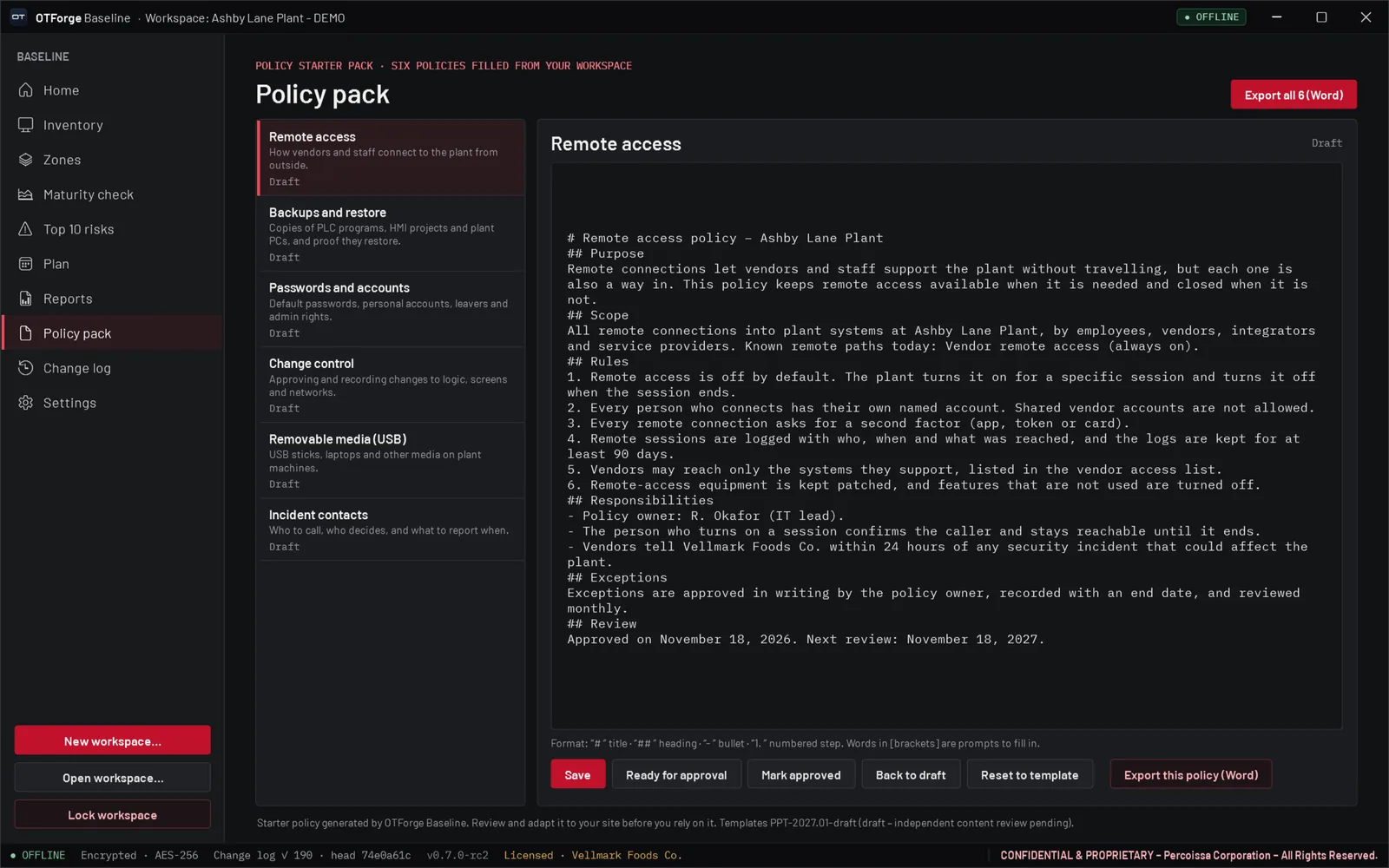
Six starter policies filled from your workspace: remote access, backups, passwords, change control, removable media and incident contacts.

/08

Quarterly Re-Runs

Lock a run, start the next with answers carried forward, and see progress over time and what changed since last time.

02 — How It Works

Six steps.
One workspace.

Real screens from the OTForge Baseline release candidate. The plant, company and people are fictional demo data. Click any screen to enlarge it.

Step 1 · Inventory

Know what you run.

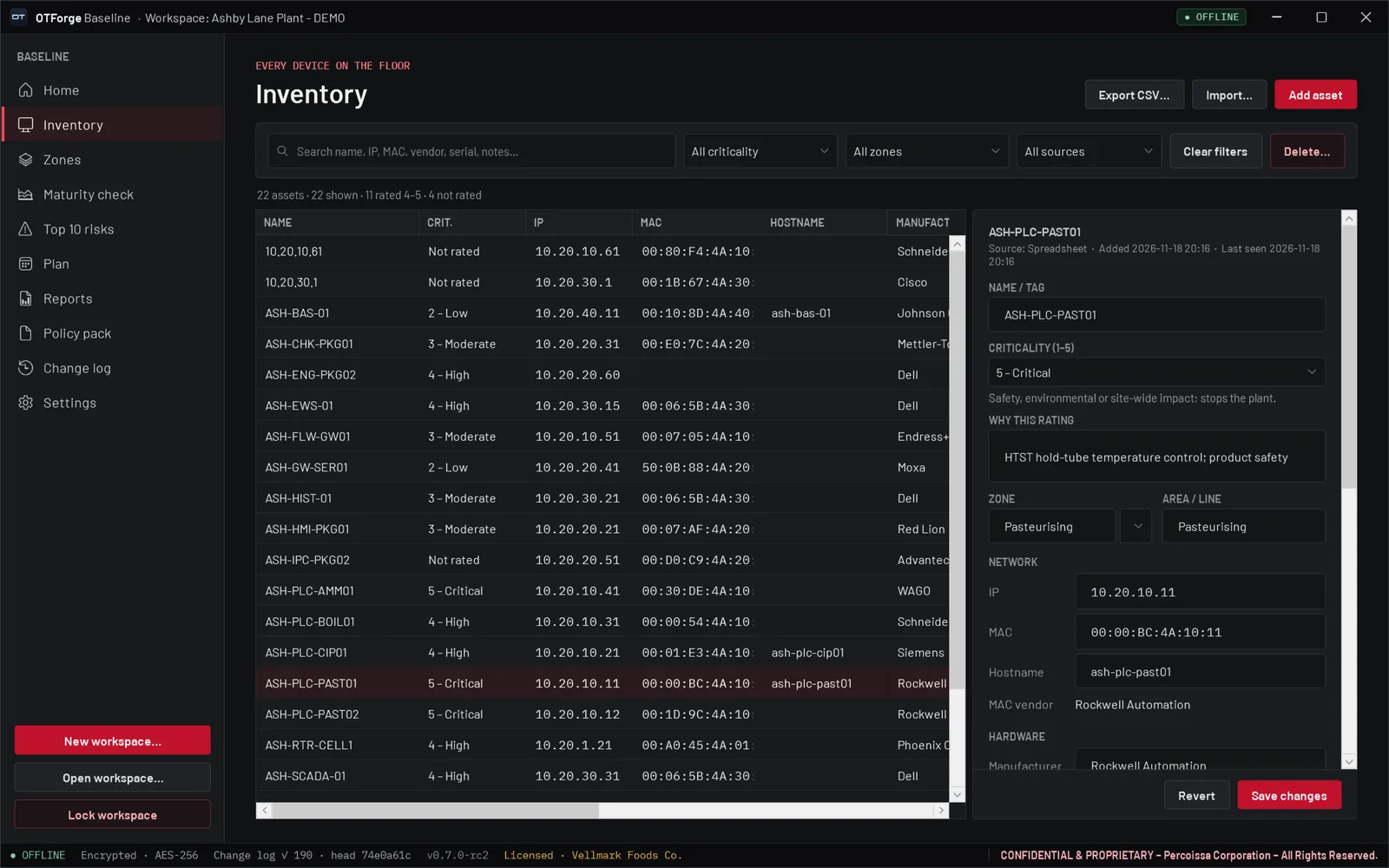
Bring in what you already have instead of starting from a blank page. Baseline never scans your network; it works from the files you give it.

  • Spreadsheets, ARP tables, earlier scan files and switch MAC tables
  • Offline MAC-vendor lookup, search and filters
  • Criticality 1–5 with the reason written down; CSV export
Inventory
OTForge Baseline inventory screen with asset list and asset detail
Inventory with asset detail
Step 2 · Zones

See how it connects.

Answer six plain-language questions and Baseline suggests a zone sketch: a layered diagram of zones and conduits, with notes on what the findings mean.

  • Drag assets onto zones
  • “What this means” notes for each finding
  • Export the zone sketch as a PNG
Zones
OTForge Baseline zones screen with guided questions and zone diagram
Guided zone sketch and diagram
Step 3 · Maturity Check

Answer in plain language.

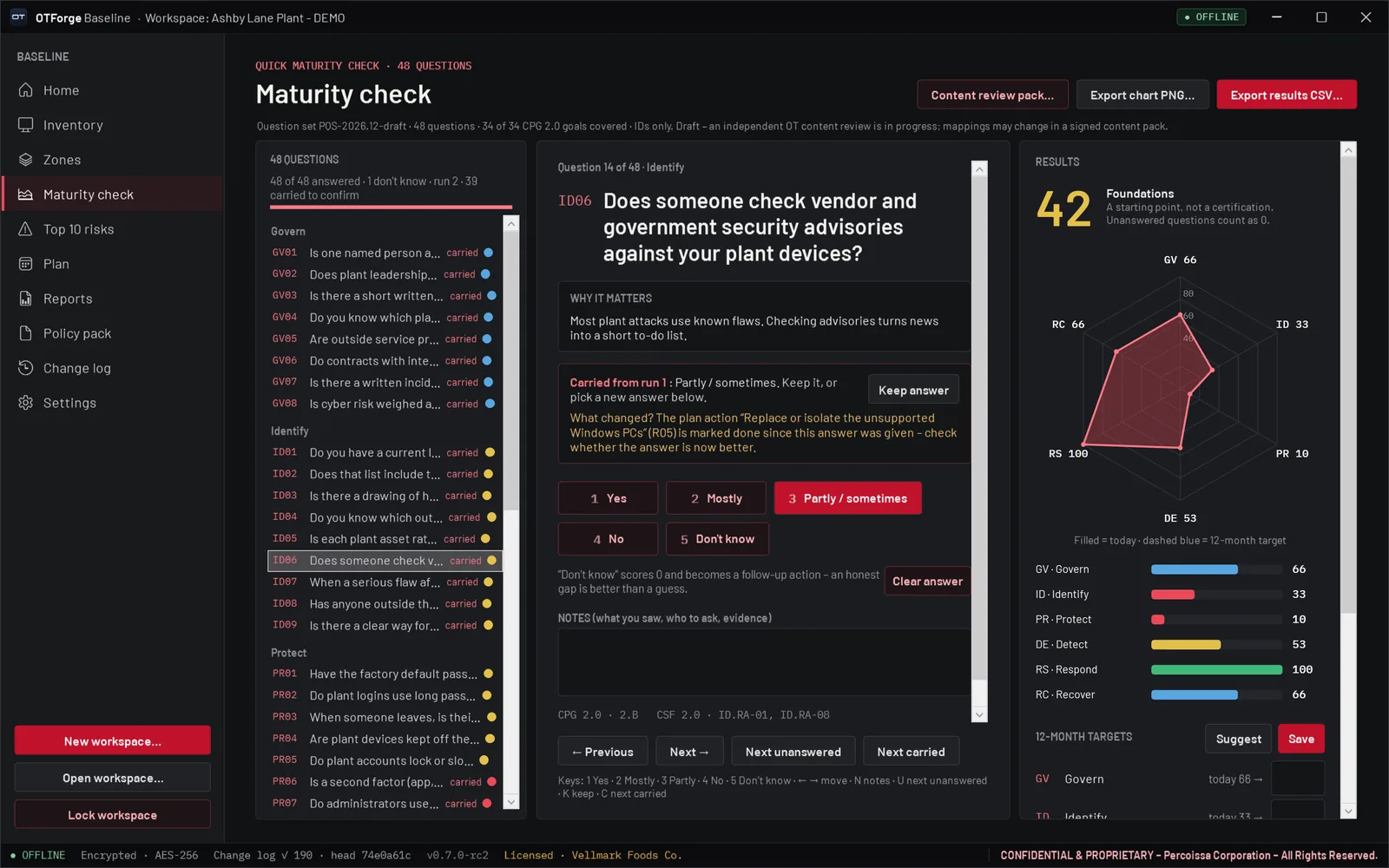
48 questions across Govern, Identify, Protect, Detect, Respond and Recover, one at a time, each with why it matters. “Don’t know” is a valid answer and becomes a follow-up action.

  • Overall score and radar with editable 12-month targets
  • Questions carry reference IDs from CISA CPG 2.0 and NIST CSF 2.0
  • Results as CSV, radar as PNG
Maturity check
OTForge Baseline maturity check question with score radar
One question at a time, with the radar
Step 4 · Top 10 Risks

Fix what matters first.

Baseline ranks your top 10 risks from your own inventory, zones and answers, and shows the evidence it used, so the list is about your plant, not a generic checklist.

  • Three concrete steps and “what good looks like”
  • Effort and cost bands, owner and due date
  • “Quick wins only” filter and re-rank
Top 10 risks
OTForge Baseline top 10 risks with evidence panel
Ranked risks with evidence
Step 5 · Plan

Turn risks into a 30/60/90.

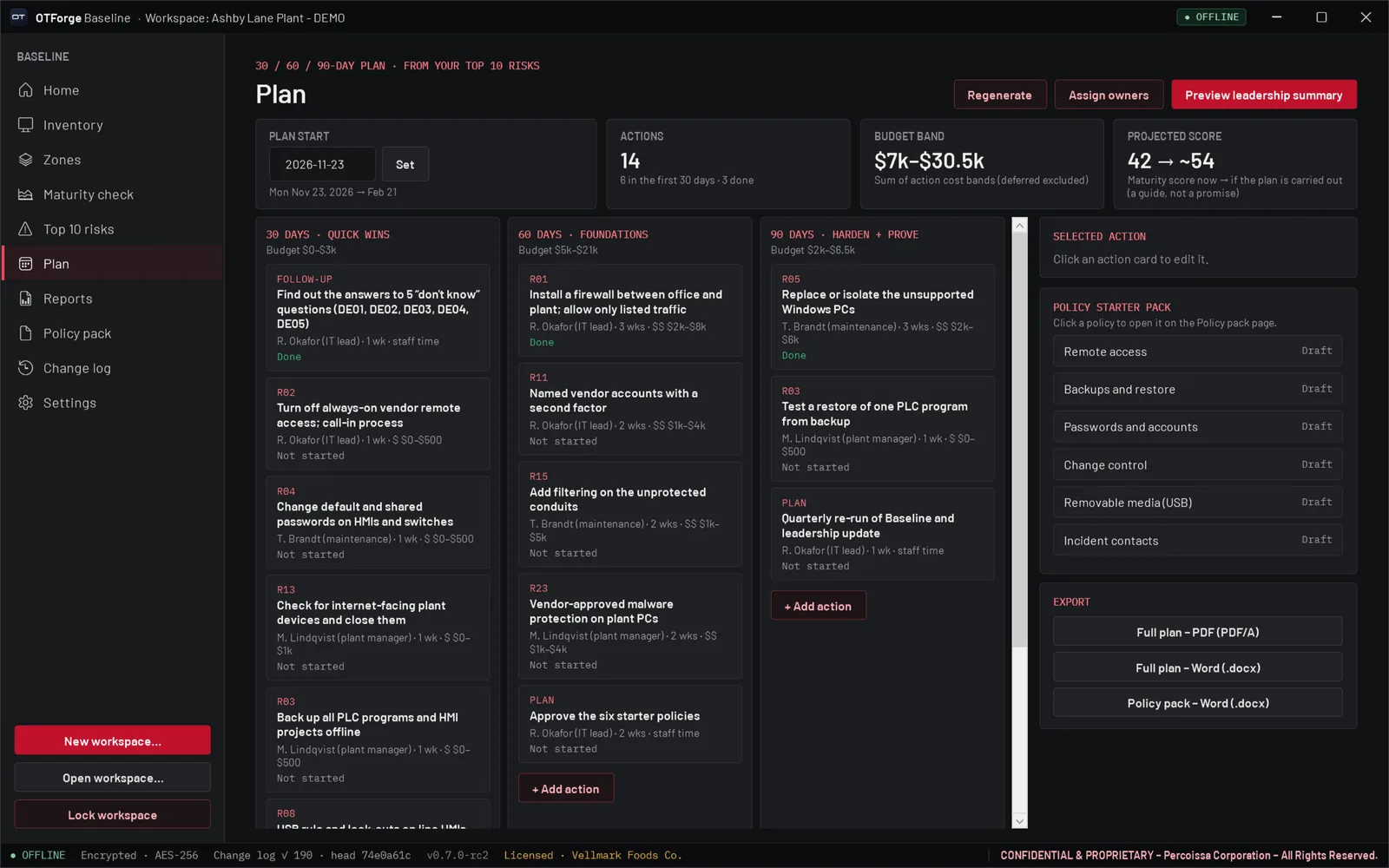
The plan is generated from your top 10: quick wins first, foundations next, then harden and prove. Assign owners, see the budget band and the projected score.

  • Edit, move and add actions
  • Owner timeline across the 90 days
  • Regenerate keeps the actions you added
Plan
OTForge Baseline 30/60/90-day plan with budget band and projected score
30/60/90-day plan with budget band
Step 6 · Reports

One page for leadership.

Preview the one-page leadership summary in the app, edit the decisions you need, and export it, along with the full plan, as PDF or Word.

  • Score, plan, top 5 risks and decisions on one page
  • Your organization’s confidentiality marking on every page
  • A content SHA-256 on every page
Reports
OTForge Baseline reports screen previewing the leadership summary
Leadership summary preview
03 — More Screens

Keep it going,
quarter after quarter.

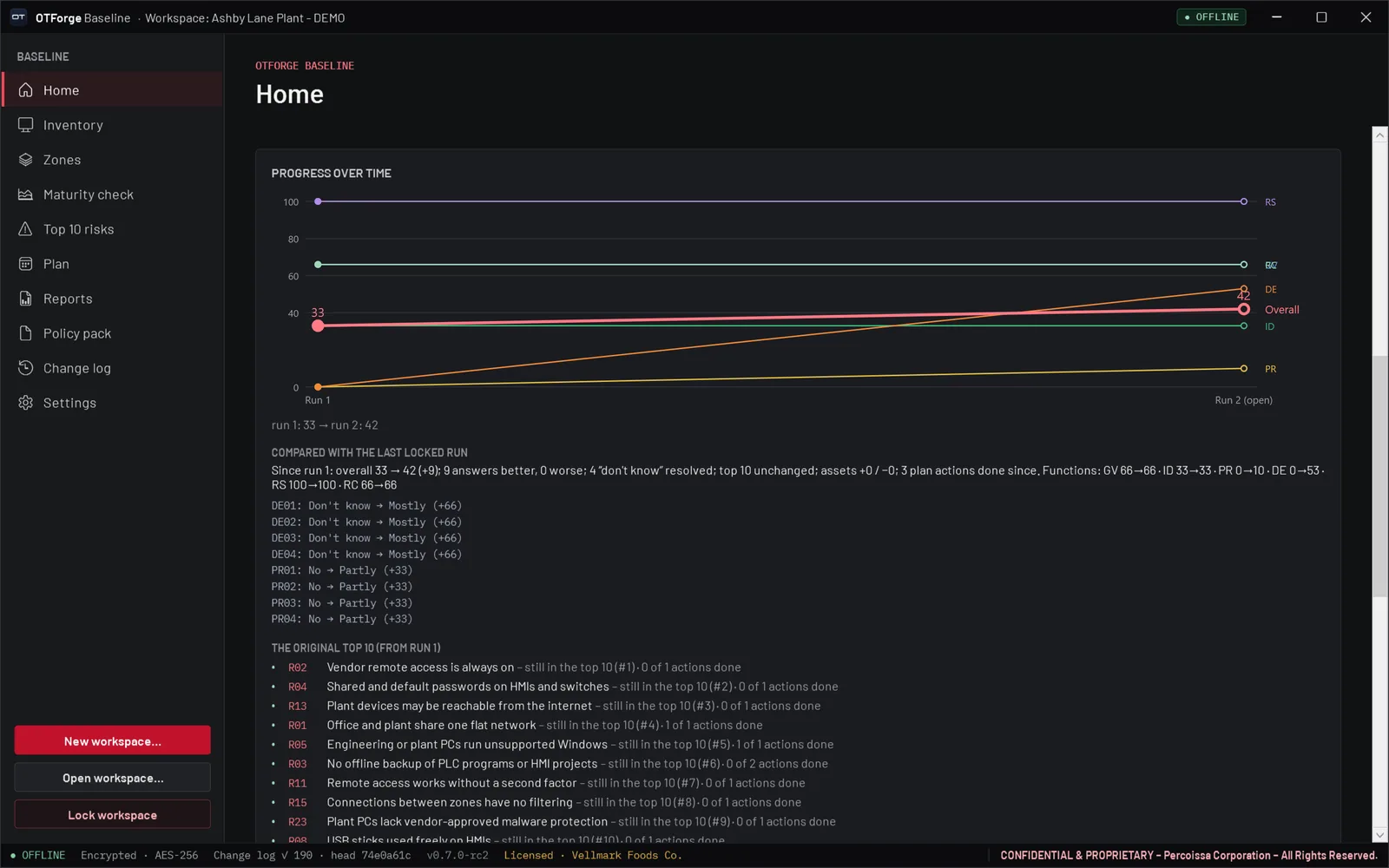
Re-run every quarter with your answers carried forward, track progress, and keep a record of every change.

OTForge Baseline home with the quarterly re-run checklist
Re-run checklistEach step opens the right screen
OTForge Baseline progress over time chart
Progress over timeTrend and “since last run”
OTForge Baseline quarterly runs with locked run history
Quarterly runsLocked, hashed run history
OTForge Baseline policy pack with six starter policies
Policy packSix starter policies, Word export
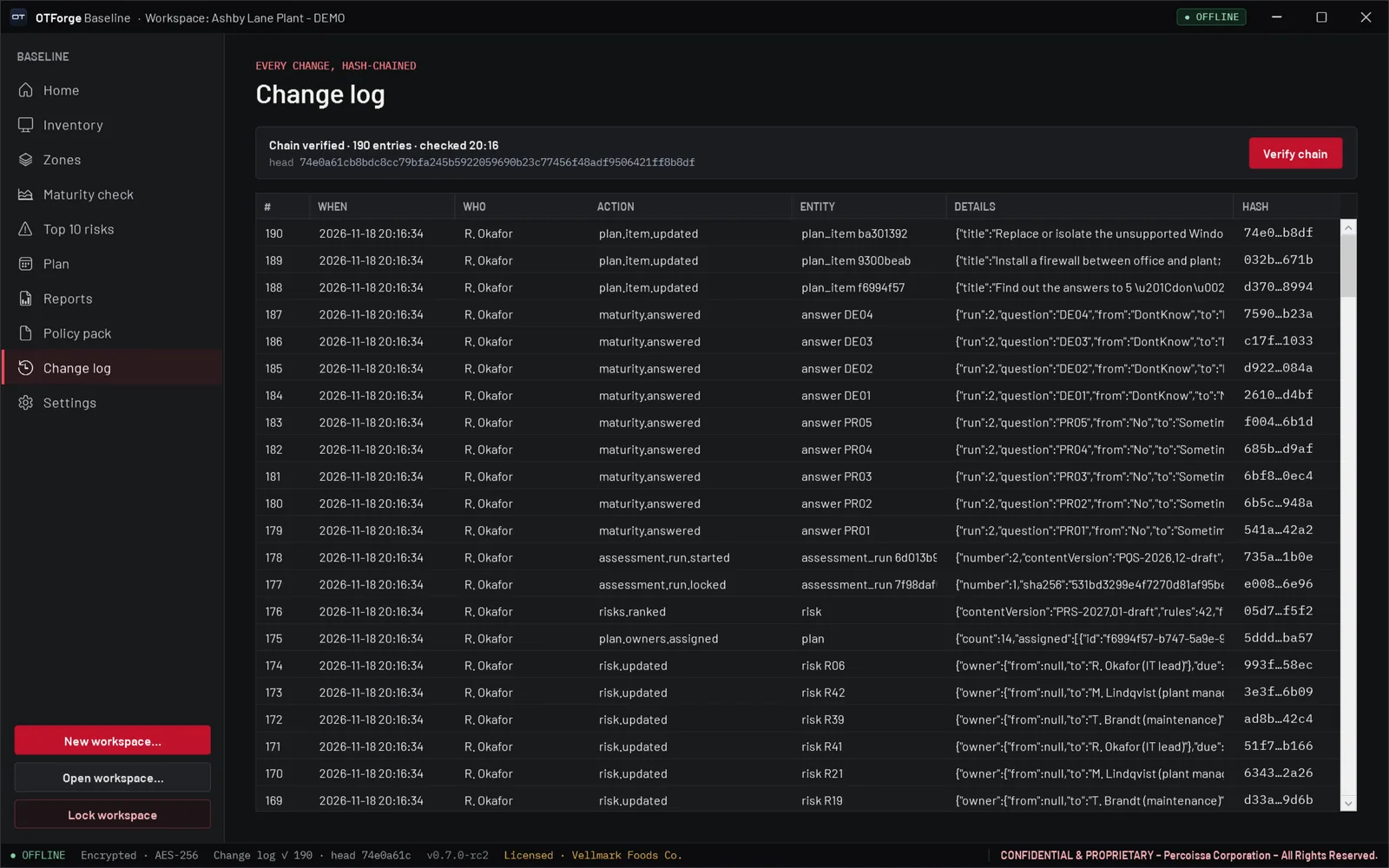
OTForge Baseline change log with verified hash chain
Change logHash-chained and verifiable
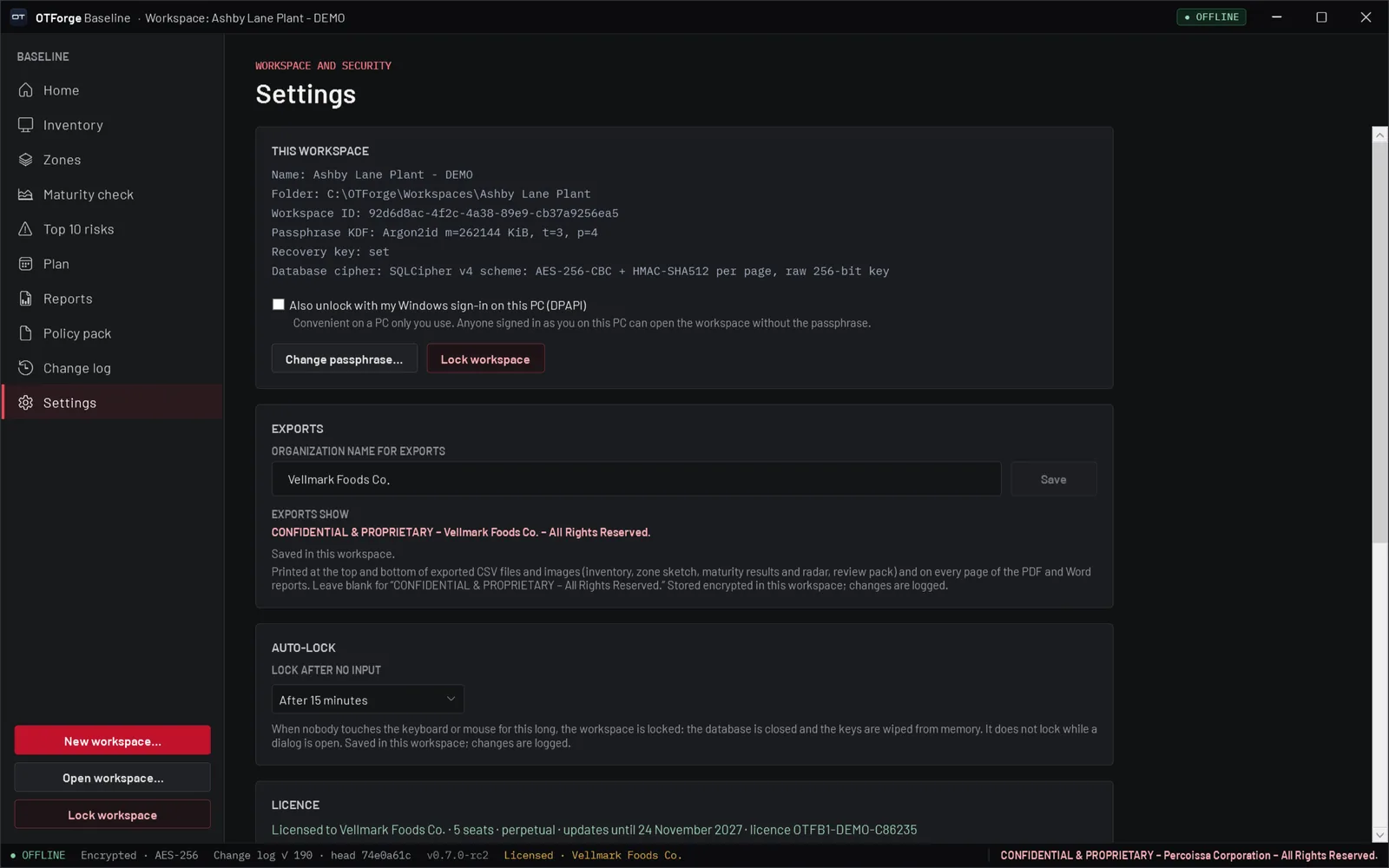
OTForge Baseline settings with workspace, exports and auto-lock
SettingsWorkspace, export marking, auto-lock
04 — What You Hand Over

Real outputs,
made offline.

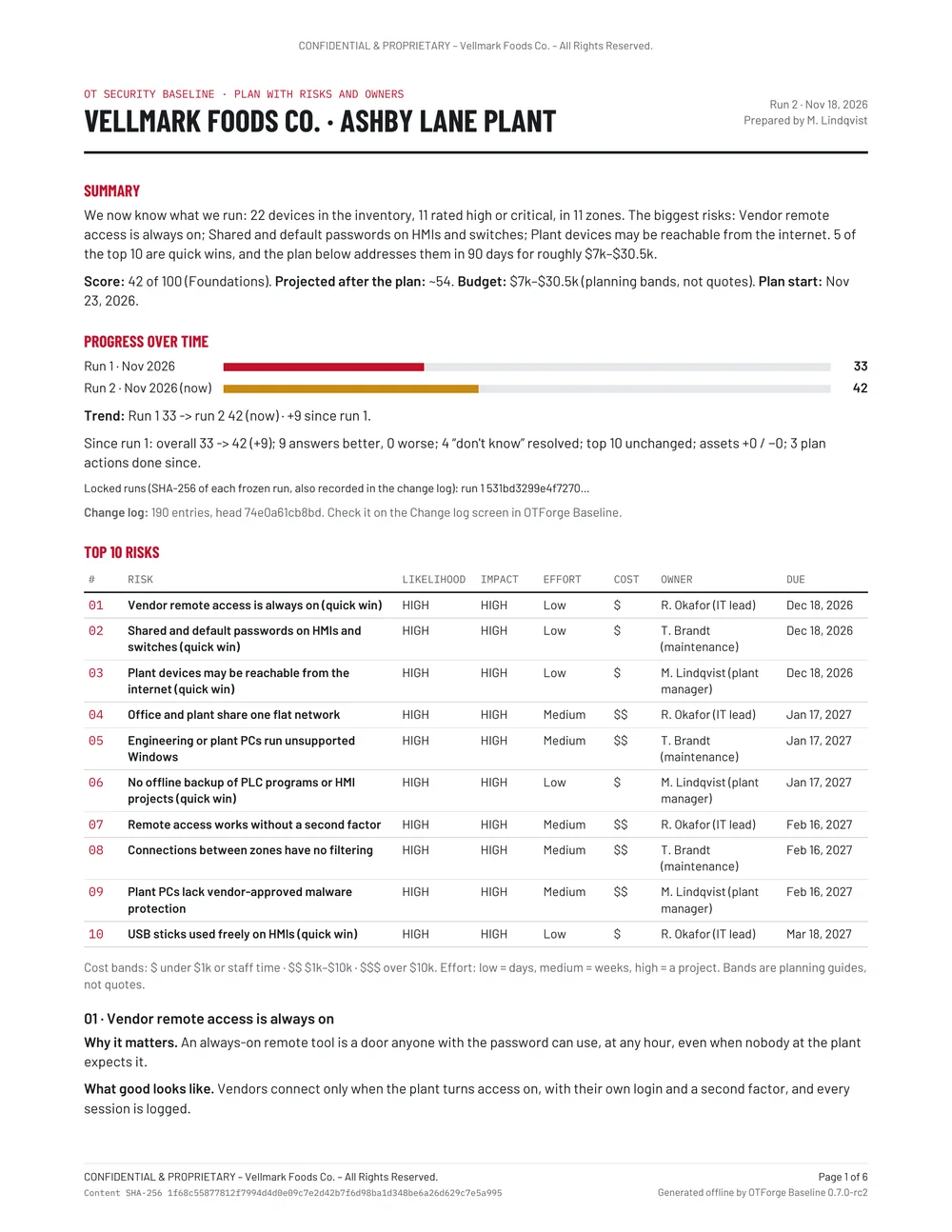
The app’s own exports from the same demo workspace: the one-page leadership summary, the full plan, the zone sketch and the maturity radar.

One-page leadership summary exported by OTForge Baseline
Leadership summaryOne page, PDF or Word
Full plan PDF page 1 exported by OTForge Baseline
Full planPDF or Word
Zone sketch diagram exported by OTForge Baseline
Zone sketchPNG export
Maturity radar chart exported by OTForge Baseline
Maturity radarWith 12-month targets

Screens and exports from OTForge Baseline 0.7.0-rc2 (release candidate). Fictional demo data: Vellmark Foods Co., the Ashby Lane Plant, its people, devices and addresses are made up.

05 — Offline By Design

Your plant data
stays on your PC.

OTForge Baseline has no network features at all: no account, no cloud, and nothing is sent anywhere. Your workspace is a local encrypted file, and the licence is checked on the PC itself.

  • No networkNo account, no cloud, nothing sent anywhere. Baseline never scans a network; it works from files you import.
  • Encrypted workspaceOpened with your passphrase, with an optional recovery key and optional “unlock with Windows sign-in”. Argon2id key derivation and an AES-256 encrypted database.
  • Auto-lockLocks after 5, 15, 30 or 60 minutes without input, or never, your choice.
  • Change logEvery change is recorded in a hash-chained log you can verify in the app.
  • Marked exportsEvery report page carries your organization’s confidentiality marking and a content SHA-256.
  • Diagnostics“Save diagnostics” writes a zip of logs for support, with no workspace content, passphrases or recovery keys. Nothing is sent automatically.
06 — At a Glance

The essentials.

Everything you need to know before January 2027.

ProductOTForge Baseline, the first product in the OTForge family, by Percoissa
Runs onWindows 10 and Windows 11, 64-bit (x64)
InstallPer user, no administrator rights needed; can also run from a folder
WorksFully offline: no account, no cloud, nothing sent anywhere
ImportsSpreadsheets, ARP tables, earlier network-scan files (XML) and switch MAC tables
ExportsLeadership summary (PDF/A or Word), full plan (PDF or Word), policy pack (Word), CSV and PNG
LicencePerpetual, per seat, with 12 months of updates included; an offline licence file checked on the PC, no activation server
Hand-offExports one sealed, passphrase-encrypted hand-off file for a future OTForge Vault
AvailabilityComing January 2027
07 — Coming Soon

Coming
January 2027.

OTForge Baseline is planned for January 2027 for Windows 10 and 11. Want to know the day it lands? Drop us a line and we will let you know.

Planned availabilityJanuary 2027
Get Notified →
08 — FAQ

Good
questions.

The essentials about OTForge Baseline before launch.

Who is it for?

Small and mid-sized industrial teams, such as plant IT, controls, maintenance and operations leads, who need a practical starting point for OT security rather than an enterprise platform.

When can I get it?

OTForge Baseline is coming in January 2027. Ask to be notified.

Does it scan my network?

No. Baseline never scans a network. It builds the inventory from files you already have: spreadsheets, ARP tables, earlier scan files and switch MAC tables, plus anything you add by hand.

Does any data leave the PC?

No. Baseline has no network features, no account and no cloud. Your workspace is encrypted on the PC, and the licence is checked locally.

Is it an audit or a certification?

No. It is a self-assessment starting point, not an audit and not a certification. Questions and risks carry reference IDs from CISA CPG 2.0 and NIST CSF 2.0 so you can trace them.

What do I need to run it?

A Windows 10 or Windows 11 PC (64-bit). It installs per user without administrator rights, or runs from a folder.

Screens show OTForge Baseline 0.7.0-rc2, a release candidate; details may change before release. The question set, risk rules and policy templates are drafts under independent review. OTForge Baseline is a planning aid and is not intended for safety-instrumented or life-safety decisions. Demo data is fictional.